
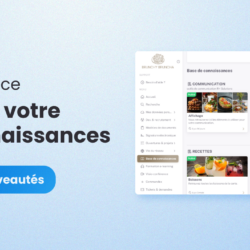
New Cerca Interface: Customize your knowledge base
We’re thrilled to share the latest updates on the redesign of our Cerca solution. This week, we’re highlighting our knowledge base—an essential feature for any multi-location network. A Clean, Modern Interface for Your Knowledge Base We’ve carefully redesigned the interface to be both modern and streamlined. This new look doesn’t compromise functionality, however. Every element has been designed to provide a smooth and enjoyable user experience. Visual customization options allow you to create an interface that perfectly reflects your network’s identity, while remaining elegant and professional. Enhanced customization Like the Home page, the knowledge base now features new customization options. With this new interface, you can add custom covers to your books using images, colors, and icons. This visual customization makes your resources more appealing and easily accessible, making it easier for your users to quickly identify crucial information. Simplified Editing Add and edit the content of your books and book groups directly from the knowledge base, without going through a complex administration process. This feature makes managing your resources more intuitive and efficient, ideal for quick and accurate updates. No more navigating back and forth through complex menus; everything is accessible in just a few clicks for optimized management of your documentation. Training and engagement of your network The knowledge base isn’t just a document management tool. It’s also a powerful way to optimize training and engagement within your network. By centralizing all your educational and informational resources in one place, you make it easier for your employees and/or franchisees to access information. Whether it’s procedure guides, training videos, or PDF documents, everything is now accessible in a seamless and intuitive way. Your Resources, Wherever You Are With the new knowledge base interface, accessing your resources has never been easier. Thanks to our mobile app, your employees can view and edit content from their smartphone or tablet, no matter where they are. This increased mobility allows for maximum flexibility and ensures that your teams stay connected and informed at all times, without being constrained by office access limitations. Control and security remain at the heart of our solution The security of your information is our top priority. You can always precisely control who has access to which resources. Advanced permission settings allow you to restrict access to sensitive documents and ensure that only authorized individuals can view or edit content—even though this is no longer done through the Administration menu. This feature is essential for protecting confidential information on your network. We’re confident that these improvements will help strengthen expertise and engagement within a multi-site network, while offering a more enjoyable and efficient user experience. Looking for a packaged solution that can also adapt to your needs? Join the Cerca revolution and request your free, no-obligation 1-month trial. I’m joining the Cerca revolution You might also be interested in these articles:



 Français
  English
  Español