
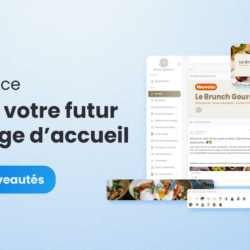
New Cerca Interface: Customize your home page
We have some exciting news to share with you! Following the launch of our new mobile app, we’re thrilled to announce a complete redesign of the Cerca interface. We’ll be gradually rolling out this new Cerca interface over the next few weeks, starting with the home page customization. Discover these customization options ⬇ The New Cerca Interface: Customization and Flexibility Even More Visuals to Enhance the Platform It was crucial for us to strike a balance between modernity and customization for this new Cerca interface. Modern interfaces are often very minimalist, which can limit customization options. To address this challenge, we decided to offer the ability to place more visuals and arrange them as desired. This flexibility allows us to create a platform that reflects a network’s brand identity while maintaining a modern and elegant aesthetic. Our clients thus benefit from an interface that is both sophisticated and customizable, optimizing the user experience without sacrificing modernity. With this new Cerca interface, it’s possible to add and position dynamic carousels, eye-catching images, and personalized content—including rich text, videos, and more. A Tailored Welcome This customization of the interface to match a network’s brand image goes beyond mere aesthetics. It strengthens engagement and adoption of the solution within a network. With Cerca, multi-location networks can offer their members an online environment that resonates with their culture and values and is tailored to their use of the platform. Position your elements on your Home page and decide what to highlight: This could be the network’s latest news announcing the opening of a new location, or recent updates to your operations manual to keep your employees informed of the latest processes. The information and resources most important to network users are thus highlighted. Tailoring the interface to specific needs ensures a positive first impression and a more intuitive user experience for the network. A Dark or Light Menu Choose between a dark or light menu to align the interface with your visual identity and showcase your logo. This aesthetic flexibility allows you to highlight your brand colors. Whether you prefer a modern, minimalist look with a light theme or an elegant, sophisticated aesthetic with a dark theme, it’s all possible. Looking for a turnkey solution that can also adapt to your needs? Join the Cerca revolution and sign up for your free, no-obligation 1-month trial. I’m joining the Cerca revolution You might also be interested in these articles:



 Français
  English
  Español